
Timesheets on paper
On many construction sites, working hours still travel like this: the foreman writes them in a notebook or on a sheet of paper, sends a photo to the office at the end of the week, and at the end of the month someone copies them into Excel. Only then does anyone see how many hours went into which site.
Every step in that chain is a chance for a mistake: illegible handwriting, a forgotten day, a worker booked to the wrong site. And the overview arrives too late: when you see at the end of the month that a site has eaten more hours than planned, there is nothing left to change.
Hours are recorded where they happen
Workers check in on site through Constructis, and their hours are kept in the time tracking module — the same one the company uses for the office. Constructis shows them with the site they belong to. Nothing is copied, and nothing waits for the end of the month.
On every site, the Workers tab shows:
- the total hours of all workers on the site,
- the number of workers in the selected period,
- average hours per worker,
- the number of working days,
- a chart of hours per day, where days that stand out are visible at a glance (Sundays and public holidays are marked in red),
- the most active workers,
- a list of workers: how much each of them worked and how long they were absent (sick leave, annual leave).
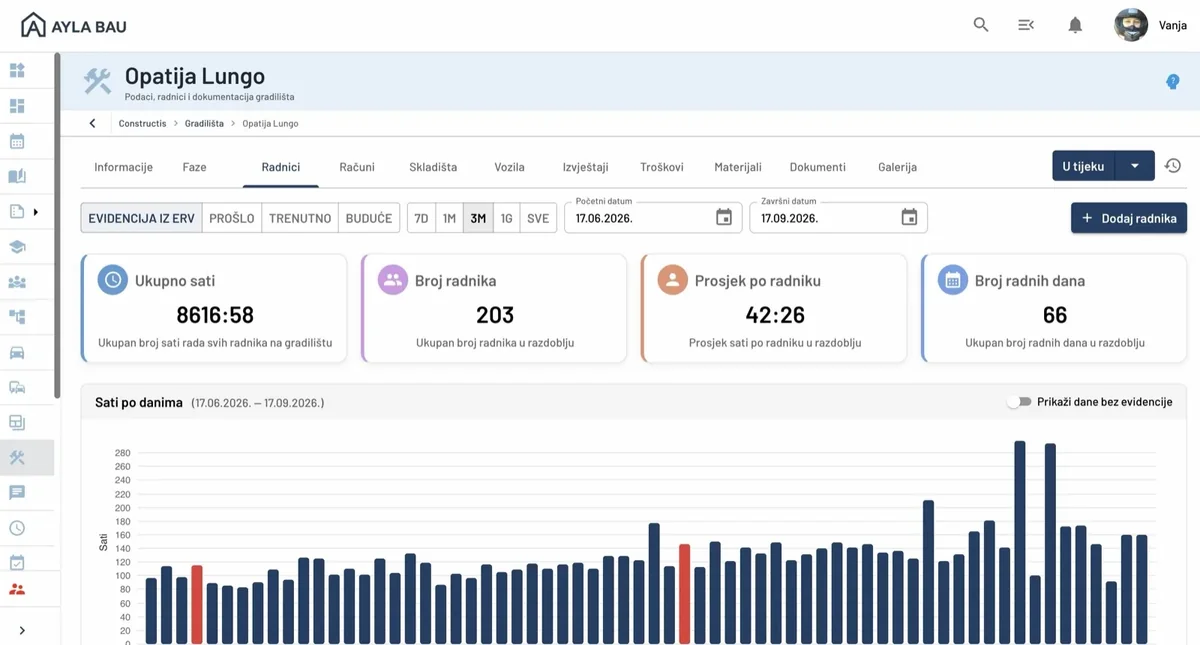
The period is chosen with a single click — the last seven days, a month, three months, a year or the whole duration of the site — or you enter your own date range.
Questions answered straight away
With all hours in one place, a manager no longer has to call the foremen to find out:
- how many people are on which site today,
- who worked and who was absent, and why,
- how many hours and working days went into a site in the last week, the last month or since the work began,
- on which site hours are growing faster than they should.
The list of workers with their hours can be exported to Excel, CSV, JSON or XML, so payroll gets data already sorted by site instead of a stack of paper to copy.
Hours are also cost
Working hours are not just a record; on most sites they are the largest share of the cost. That is why Constructis multiplies the recorded hours by the hourly rate and includes them in the site's costs, alongside materials, invoices and other expenses. More on that in What does a construction site really cost you?
Try it on your own site
Time tracking is one part of Constructis, the software for construction companies we have been developing for ten years. Get in touch and we will show you what it would look like on your sites.