
Checking on sites by phone
When a company runs several sites at once, a good part of a manager's day goes on questions: how many people are where, is a site running late, has the material arrived, what got done yesterday. The answers come by phone, by message or by driving out, and the picture of all sites exists only in somebody's head.
A quick overview of all sites
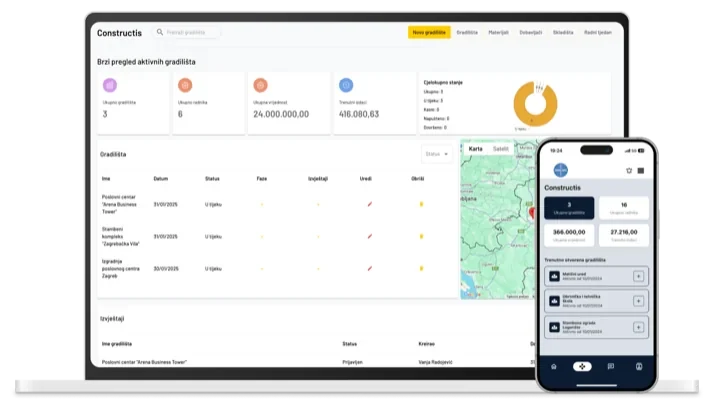
On its start screen, Constructis shows a quick overview for the whole company:
- the number of active sites,
- active workers — right now and on average per day,
- the total contracted value and current expenses,
- the share of sites by status: in progress, late, abandoned, completed.
Clicking a card opens a breakdown over the last one, three, six or twelve months. Below are a list of all sites with their status, phases and reports, a map showing where they are, and a list of the latest reports.
The system sets the statuses itself, based on dates: a site whose planned completion date has passed without it being closed is marked Late. You do not need to go looking for it; it shows up in the overview. Every status change is recorded with the date and the person who made it.
Everything about a site in one place
Every site has its own view with information, work phases, workers, invoices, storage, vehicles, reports, costs, materials, documents and a photo gallery. The information tab shows at a glance the budget, costs and the difference between them, the number of workers and the site's location on the map.
We write about working hours and costs in more detail in Working hours on site without paper timesheets and What does a construction site really cost you?
A site diary that arrives by itself
What used to be handwritten in the site diary, the foreman enters in Constructis as a daily report: the phase of work, what was done, materials used, other expenses and photos from the site. The site manager accepts the report or sends it back with a comment, which is mandatory when rejecting, so the foreman knows what to correct. Only approved reports count towards the site's costs.
For management or the client, a director can write a summary report on the state of a site, with photos from the gallery.
The field and the office in one system
Constructis works in the browser and in a mobile app, so the foreman writes the report where the work is done, and the office sees it straight away, without copying anything.
Because people on site often do not share a language, Constructis translates reports, work phases, expense descriptions, chat messages and announcements: everyone reads them in their own language, and the original is always one click away. More in Everyone in their own language.
Constructis is part of Office Assistant, so the site and the office share one system: chat and announcements, time tracking, approval of invoices and delivery notes, and the company-wide map.
See your sites on one screen
We have been developing Constructis together with construction companies for ten years. Get in touch and we will show you what the overview of your sites would look like.